09 Oct
computer mouse

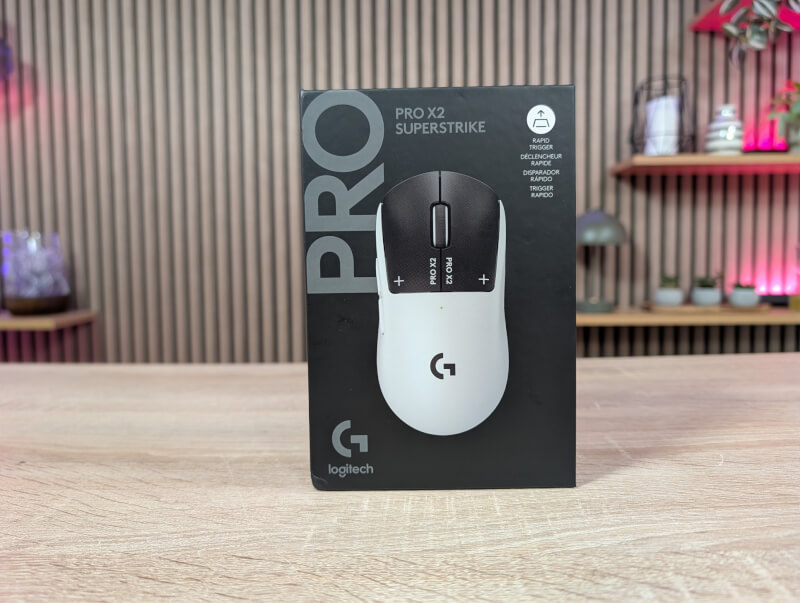
The most central feature here is clearly Logitech's Superstrike technology, which is a completely new way of making a mouse button. We'll get into more detail about how it's put together in a moment.
Let's start by getting the most obvious thing out of the way, namely the design. Here Logitech has completely gone with their now well-known style for their gaming mice. It's the same shape and design that we've seen from them for a long time. They live by the mantra: “If it ain't broke, don't fix it”
The design was created based on a lot of feedback from professional gamers, so it must be very good. It is in every way the same as what we get with the Pro X2 Superlight mouse.
The very similar-looking design is probably also the reason why they have shaken things up a bit with the new black/white color scheme for the Logitech G PRO X2 SUPERSTRIKE. This way you can clearly see that it is the new Superstrike mouse, with the black buttons standing out.
But it's precisely under them that the new features are hidden. Normally, a mouse works by pressing a physical switch until it is activated. In SUPERSTRIKE, Logitech uses what they call the Haptic Inductive Trigger System (HITS).
This means that the mouse uses inductive sensors to measure how far you press the button. Because it is digitally controlled rather than mechanically, you can determine the actuation point, i.e. how early the click should be registered. In the same way as we know it from Hall Effect switches on keyboards.
The system offers 10 different levels. It's very similar to the hall effect feature we've seen on keyboards like Wooting, SteelSeries, and Logitech's own Pro X TKL Rapid, but now moved to the mouse. Logitech claims it can improve latency by up to 30ms.
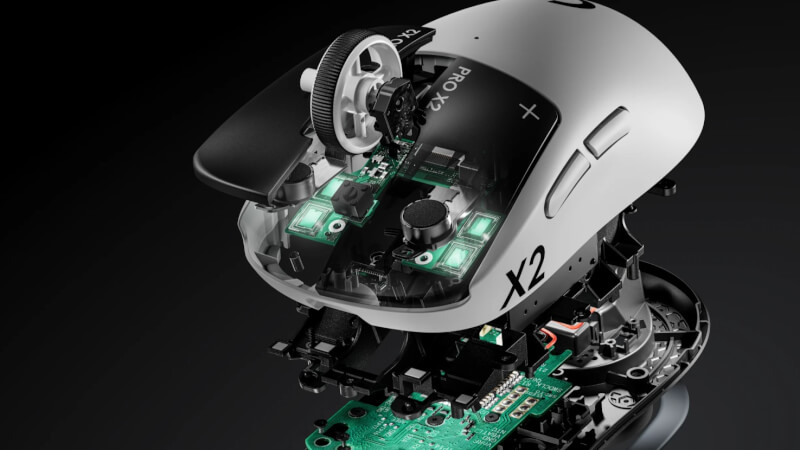
On top of that, they've also added the Rapid Trigger option, which means the buttons reset and are ready for new clicks the moment you release it just a little. The two things combined mean you can get VERY fast clicks with the Superstrike.
When you remove the mechanical switch, you also remove the physical "click". This can be clearly felt when the mouse is turned off. Here, there is no physical "click" on the mouse at all when you press the button down, which feels very strange. That's why Logitech has built in haptic feedback. This ensures that you feel the click exactly at the moment the signal is sent to the PC, regardless of where you have set your actuation point.
Logitech has created a "fake" click, and as soon as the mouse is powered on, it feels significantly more natural to click on it. You can also adjust the strength of this feedback in five steps or turn it off.
The new technology is only found on the two primary buttons, while the scroll wheel and the two side buttons are completely “normal”, like on Logitech's other Pro X series.
If we look at the bottom of the mouse, we can see that things are the same here as we know from the other Pro X mice. The Hero 2 sensor is not new, but rather a well-known stable sensor.
We also have support for Logitech's Powerplay by replacing the small Puck at the bottom. Underneath it is also a place to store the included Lightspeed USB Dongle.
Control and customization of the Logitech G PRO X2 SUPERSTRIKE is done like all other Logitech gaming products through their G hub software.
Here we get all the usual options for customizing buttons, polling rate, etc. Logitech has given us a selection of DPI and Polling Rate profiles, which are based on a number of different game genres. They each come with between one and five DPI steps that you can switch between.
If you want a more specifically customized DPI profile, you can also set up the settings so that your DPI settings are different on the X and Y axes. You are free to choose the profiles that you think best suit your needs or create your own.
Via the software we also have the option to customize the functions of the five buttons. Here there are very wide options for everything from Windows or software specific shortcuts to media control and Macro options.
In this case, however, the new and exciting feature is clearly the customization of the primary buttons with their Haptic Inductive Trigger System. Just as we are used to from analog keyboards, we now also have the option on our Superstrike mouse to customize the activation point. As mentioned, this can be done in 10 steps. Although on paper it may not seem like there should be much difference, the difference between the two extremes feels enormous.
The software gives you a live preview when you press the right or left mouse button, so you can get a feel for where you think your sweet spot is.
On top of that, you also have the option to activate Rapid Trigger aka Quick Release (ho ho ho)
The settings get their own section where we can customize the Activation Point, Rapid Trigger and haptic feedback.
Here you can customize things in a combination of the activation distance, Reset Point/Rapid Trigger, and the haptic feedback.
The three values can be adjusted independently of each other and separately for the right and left buttons, which gives you a pretty good chance of adjusting things so you can find a sweet spot that suits you.
That said, it's important to make it clear that in the big picture, all else being equal, the margins you're moving are still quite small. I'll talk about my experience of the new features a little later during the test.
As always, my experience with Logitech G Hub has been nice and stable and without any problems during testing. At the same time, it is not a program that is filled with too much unnecessary stuff.
I've been using the G Pro X2 Superstrike for a few weeks for the classic mix of desktop use and a good dose of gaming. It's naturally in gaming that the new features come into their own.
Apart from the new primary buttons with Logitech's Haptic Inductive Trigger System, everything else about the mouse is the same as we get on Logitech's Superlight mouse.
It is therefore primarily the experience of the new buttons that I will stick to in this test. The wireless connection, sensor, shape, etc. are, as I said, completely the same as on the Pro X Superlight 2, which is now a couple of years old. It is still a fantastic mouse with good features that can currently be found for around 900 kroner.
As with other Logitech Pro X mice, I also find it a bit too slippery in my hands. I don't have a particularly good grip on the mouse, but luckily Logitech still includes their grip pads in the box, and they quickly came on the mouse during testing.
Having said all that, I feel like with the Superstrike mouse we are getting a mouse that for the first time in a long time is actually pushing my gaming performance. The Superstrike mouse is hands down the fastest mouse I have ever tried. Tracking etc is no different than the Superlight 2, but my reaction time has improved simply because the primary buttons with the new Haptic Inductive Trigger System are SO much faster.
Logitech itself advertises a latency reduction of up to 30 ms. This improvement is achieved via the new Haptic Inductive Trigger System, and not because the wireless connection or anything else is better. It's simply because you no longer have a mechanical button that delays your inputs.
The Haptic Inductive Trigger System uses electromagnetism to measure your input, and with the activation distance set to the lowest setting and rapid trigger turned on, you almost only have to look at the button before it registers an input.
In addition to real gaming in games like Space Marine 2, Cyberpunk 2077 and similar games, I have also tested my reaction time and click speed in, for example, Aimlab with the activation distance set to the lowest possible and rapid trigger activated.
Here the results were clear, and if we look at how many inputs I can achieve in a five-second period, for example, I managed between 15% and 25% more clicks with the Superstrike, compared to an ASUS ROG Harpe II Ace mouse, which is certainly also in the good class of gaming mice. So here you can clearly feel the result of a short activation distance and rapid trigger.
Looking at the reaction time in Aimlabs, the results are not quite as impressive, but still consistently better with Superstrike. Here I saw an average improvement in reaction times of around 6%.
The Logitech G Pro X2 Superstrike feels super fast on the buttons, and the results also show a clear and measurable difference. As I said, it's also the first mouse in a long time where I actually feel that the new features noticeably shift my results.
Of course, this doesn't mean that I'm now at Pro level, but it's a small noticeable difference that might offset some of the decline that a gamer in their mid-40s experiences. It's inevitable that your reaction time will slowly decline with age. However, here's a mouse that I feel has caught up a bit, more than I've experienced before with new features like improved sensors or an 8000 Hz polling rate.
However, it's only in the response time on the buttons that things are changing. Other elements like tracking etc. are the same, so it's not because everything is getting better.
For me personally, it is noticeable and I think that players at Pro Level will see even better results than me. Logitech has brought something to the market with their Haptic Inductive Trigger System that I feel will make a huge difference going forward.
Currently, Logitech is the only one with this technology, which they have patented. So if you want to benefit from it, the Superstrike mouse is your only option and will likely be for a long time to come.
This review is published before the Logitech G PRO X2 SUPERSTRIKE hits stores. However, Logitech and some other stores have it listed on their websites with a preorder price of $179.99.
This means that the price matches the Logitech Pro X Superlight 2c and the like. mouse. It is not the most expensive gaming mouse on the market, but it is definitely in the upper part of the price segment.
As I mentioned during my test, my time with the Logitech Pro X2 Superstrike has been the most evolving experience with a mouse I've had in a LONG time.
For the first time in a long time, I experienced testing a mouse where the new features actually measurably improved my results and the experience of my games.
Was it enough to be a turning point for my gaming skills? No! I must admit that age has caught up with me. However, it has still shifted my results in a noticeable way, which I have not experienced with anything else that has come along, over the past few years of development in the gaming mouse market.
The price for the Superstrike is still super high, and if we compare that price to what you get out of it, I still wouldn't recommend the mouse to everyone, because it's still a very expensive mouse.
If you have the budget and want the best, the Logitech G Pro X2 Superstrike is a game changer. In my opinion, it's the biggest evolution in gaming mice in a long time.
We end up with a final score of 10 and a Great Product Award, for a mouse that is so innovative. The price is high, but it's not that surprising when it's innovative technology that measurably creates better results in this way.
Advantages:
Disadvantages: