18 Sep
speaker

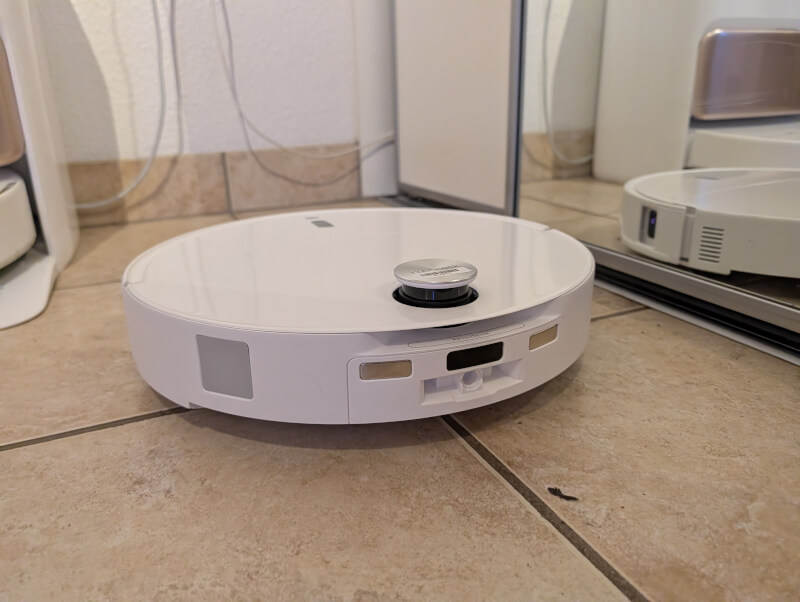
One of the points Roborock itself highlights about the Roborock Qrevo Edge 2 Pro is the improved ability to climb over higher obstacles, such as doorways up to 8.8 cm and get under furniture with a height of only 7.98 cm.
The Roborock Qrevo Edge 2 Pro is well packaged in a large box and requires some time to unpack and set up before you are ready to get started.
On the surface, there is not much new with the Roborock Qrevo Edge 2 Pro, in terms of design and layout compared to other similar systems.
The kit consists of the robot vacuum cleaner itself, in the now familiar round, slightly UFO-like design. The Qrevo Edge 2 Pro is quite low, however, with an effective height of just under 8 cm. This naturally means that it can get into places where taller vacuum cleaners would have trouble.
Along with the Qrevo Edge 2 Pro we also get a docking station. The dock serves as both a charging station for the vacuum cleaner, but it is also where the vacuum cleaner can automatically empty its dust bag, change the water continuously when mopping the floor, and clean and dry the mop.
The dock contains a dust bag, which is accessible via the front of the dock. This is also where we find a small container for detergent, so that the system can supplement it itself when mopping floors. No detergent was included with our test model of the machine, but we have been told that the final version will include soap in the box.
At the top of the dock are the two water tanks. There is one for clean water and one for the collected dirty water that comes out of the floor scrubbers.
The two are clearly marked with pictograms so you know which one is for clean and which one is for dirty water.
Built into the dock is also a system that can clean and dry the vacuum cleaner and the mop used in connection with floor washing. The mop can be cleaned thoroughly using water heated to 100 degrees to ensure hygienic cleaning of both the mop and the dock.
A full charge of the Qrevo Edge 2 Pro can be completed in about 4 hours.
If we jump back to the vacuum cleaner, this is of course where we find most of the smart features.
Navigation on the Qrevo Edge 2 Pro is handled by a combination of LiDAR, which maps the surroundings, a wide-angle camera and sensors, which in combination help the Qrevo Edge 2 Pro navigate around your home.
The LiDAR part is located in a small tower on top of the Qrevo Edge 2 Pro. It scans and maps the surroundings both in relation to the initial mapping of your home, but also in relation to general navigation in the home and avoidance of obstacles.
The smart thing about the LiDAR tower, however, is that it can be lowered when the Qrevo Edge 2 Pro needs to be able to get under low furniture, such as cabinets or sofas. Here, the other sensors can help identify when it is necessary to lower the LiDAR unit and when there is room for it again. It is when the LiDAR part is pulled down that the Qrevo Edge 2 Pro can handle a height of just under 8 cm.
According to Roborock, the camera and sensors distributed around the Qrevo Edge 2 Pro measure the exact distance to objects around the vacuum cleaner and can react in milliseconds to new obstacles, such as children or animals getting in the way.
Looking at the underside of the Qrevo Edge 2 Pro, the propulsion is handled by two large rear wheels and a nose wheel. The Qrevo Edge 2 Pro is equipped with Roborock's updated Adaptlift chassis and states that it can handle thresholds up to 8.8 cm in height. The wheels on the Qrevo Edge 2 Pro can simply lift up to make the trip over, for example, doorsteps.
It also has the other advantage that the Qrevo Edge 2 Pro can adjust the height in connection with general use by 10 mm. This can be when it encounters, for example, thick carpets. This way, you avoid the suction openings being blocked by the long fibers in the carpet.
When it comes to long things, the Qrevo Edge 2 Pro also has a practical design for the two brushes at the bottom. They are designed as RoboRock DuoDivide and angled to avoid tangled hair. Instead, they are directed towards the middle. The two brushes run at different speeds so that clumps of hair are torn apart and sucked up into the dust container.
It is also at the bottom that the two mops used for floor washing are located. They are two rotating mops, one of which can be moved to the side so that you can wash in the corners. The two mops are automatically taken off by the Qrevo Edge 2 Pro when the machine is vacuuming and are automatically put on in connection with floor washing.
Qrevo Edge 2 Pro can also dynamically detect the surface so that the mop is lifted when the robot encounters carpets, avoiding wet carpets.
Setup and control of the Qrevo Edge 2 Pro is done through the Roborock app for your phone. Before you can start cleaning, you have to go through a setup.
However, it's wonderfully straightforward and the app guides you all the way through while the vacuum cleaner is added to the app and connected to your home network.
Once the vacuum cleaner is added, it needs to map your home. It can do this automatically by driving around the home, using its many sensors to map your rooms.
You can create multiple maps if your home is divided into multiple floors, for example. In my case, it took the Qrevo Edge 2 Pro about ten minutes to map the approximately 60 m2 of our ground floor.
The system then divided the rooms based on where it had measured doorways. It wasn't quite right, but afterwards it was easy to step in and help the app divide the rooms correctly.
The system even registered the types of flooring, which consisted of a combination of tile and laminate flooring.
If there are areas in your home where Qrevo Edge 2 Pro should not be, you can set up No-Go Zones or insert virtual walls via the app.
Overall, the combination of camera and sensors on the Qrevo Edge 2 Pro was really good at identifying many of the elements it encountered on its journey through our home.
These were things like cables, furniture and other objects that it could then deal with and avoid where necessary. A super practical feature that should help prevent the vacuum cleaner from getting caught in cables or other objects around the home.
After the setup is complete, the app has plenty of options for customizing and controlling the Qrevo Edge 2 Pro and its cleaning tasks.
You can choose how you want the cleaning done and choose between vacuuming, mopping or both, and choose which rooms or areas you want cleaned. You can do it manually on an ongoing basis as you feel you need to, or you can create routines based on the needs you have in your home.
For example, it could be a task that cleans the kitchen and dining areas every day or the hallway, where people enter with dirty footwear.
It is also possible to set up cleaning on a schedule so that Qrevo Edge 2 Pro automatically starts cleaning at certain times.
In general, there are super wide options for controlling and customizing the Qrevo Edge 2 Pro through the Roborock app. There are a multitude of settings for the robot, but also for the associated dock. The options for customizing cleaning based on your specific needs are really good with the option of special focus on e.g. floors, carpets or specific areas in the home, such as special rooms or areas where pets move around with e.g. litter boxes or food bowls.
Roborock has also made vacuum cleaner and robot maintenance easy, with an overview of when the various wearing parts such as brushes and filters should be replaced.
I've had the Qrevo Edge 2 Pro for a little over a month now and have been testing it over the approximately 240 m2 I have available, spread over two floors. The composition of the house means that three zones had to be created in total with separate maps, as the house is divided in a way that the Qrevo Edge 2 Pro cannot run freely between them all.
That part of the task was easy to do but required a little work initially. In connection with the mapping, the Docken had to be moved around to the different parts of the house.
Once the mapping is complete, all you have to do is move the robot itself and select the correct map in the app. The Qrevo Edge 2 Pro can then navigate around the home and clean itself.
In this regard, it is important to be aware that when cleaning floors, the robot must regularly return to the dock to wash and moisten the mop. This naturally becomes difficult when the dock is not in the same area as the one you want to clean.
Aside from that challenge, the Qrevo Edge 2 Pro has handled the task of switching between multiple areas in fine form, and it has had no trouble figuring out where it is.
In terms of cleaning tasks, it has also done the job really well. We have a home with two adults, two small children and a dog, so there are plenty of opportunities for dirt in the home.
The Qrevo Edge 2 Pro has a suction power of 25,000 Pa, which has overcome all challenges in my test and has left floors beautifully clean. It has had a few challenges getting a good grip on a large floor mat we have in the hallway, but that must also be said to be the most challenging place in the home, especially in the winter months.
I was particularly impressed with how the Qrevo Edge 2 Pro handled navigating around the home. When mapping, I cleaned up as much as possible, removing some furniture etc. to get the best results.
However, I have only cleaned up lightly in connection with vacuuming and a little more in connection with mopping the floors. This means that the Qrevo Edge 2 Pro has been challenged by chairs being moved around and not least a selection of toys scattered around the home.
However, none of these things have caused any problems and I have never experienced the Qrevo Edge 2 Pro getting stuck or tangled in cables or anything else, which I have experienced as problems with other robot vacuum cleaners.
The system continuously recognizes furniture and fixtures in your home and intelligently updates the map. It can even take pictures of things so you can double-check them. The AI built into the Qrevo Edge 2 Pro is pretty good at recognizing objects.
The built-in AI even recognizes things like wires, shoes, etc. and marks them on the map so you can follow up on them yourself. There is even a possibility that it can recognize things like pet waste, if such things have ended up in the home. This is something that you REALLY want to avoid getting in your robot vacuum and dragging through your home.
None of the times it has been flagged by the Qrevo Edge 2 Pro have actually been left behind, but it's better for it to be overly cautious and avoid things than the alternative.
The many updates also mean that you don't always get a cleaning that gets all the way around the corners of the home. If I vacuum manually, I have to constantly move chairs etc. to get to them, and the Qrevo Edge 2 Pro obviously doesn't have that option.
However, I think this is largely offset by the convenience of simply clicking in the app and vacuuming is done. It has undoubtedly meant that we have a cleaner home than before the Qrevo Edge 2 Pro came along, simply because it is so easy to vacuum or wash the floors more often.
It's great to be able to set the Qrevo Edge 2 Pro to vacuum and wash the floor around the dining table every evening.
Being able to automate a large part of the cleaning in the home is a big bonus, and the Qrevo Edge 2 Pro does the job super efficiently.
At the time of writing, I can find the Qrevo Edge 2 Pro with an online price of around $1.599,99. This means that it is in the upper part of the mid-range segment.
With the Qrevo Edge 2 Pro, Roborock gives us an intelligent robot vacuum cleaner that, with its many features and not least good AI features, takes a large part of the work out of daily cleaning.
At the same time, a large part of the maintenance is also automated, with good options for thorough cleaning of the mops, for example, which is also nice to have.
There are undoubtedly cheaper alternatives on the market, but I think Roborock is fairly priced. However, for the price, I would have liked to have seen more accessories in the box. There were no spare parts or extra mops in the box. For example, with the MOVA V50 Ultra you get a whole box of accessories in the form of extra mops, dust bags, brushes, etc. So on that front Roborock can learn a bit.
We end up with a final score of 8, for a solid and intelligent robot vacuum cleaner, which however loses a bit in price and lacks accessories, compared to others we have looked at.
Benefits
Disadvantages