25 Sep
gadgets

Before we move on to the test, we found the sparse features and specifications of the set through Turtle Beach's own website.
Racer Wireless Racing Wheel Specifications:
Around the Racing Wireless Wheel
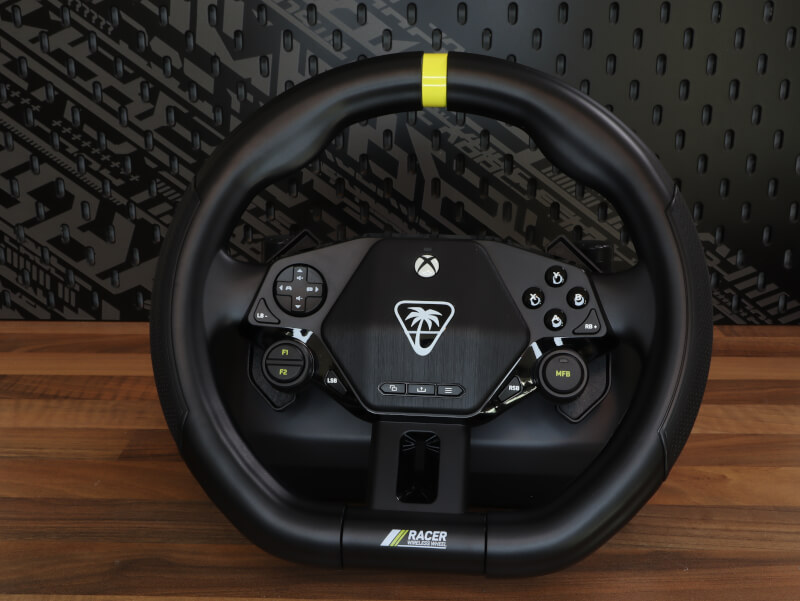
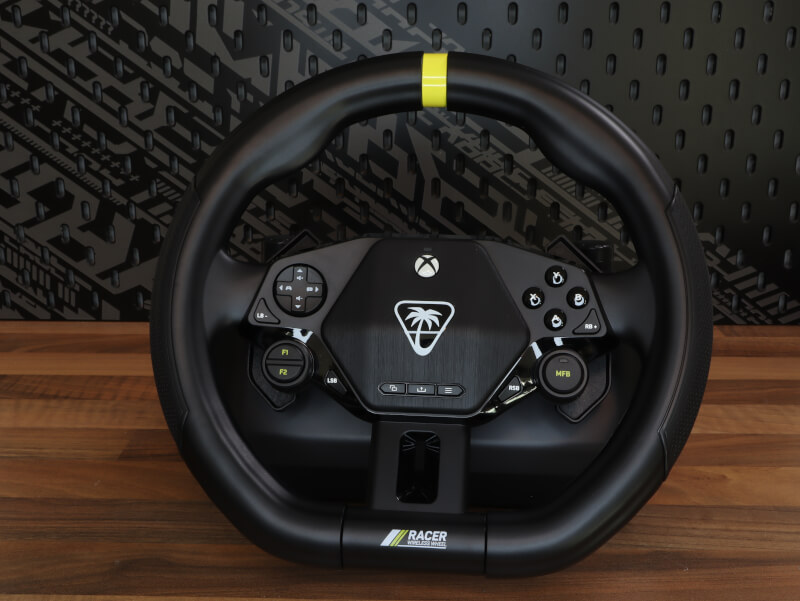
The Turtle Beach Racer Wireless Racing Wheel is a wireless racing wheel designed for both Xbox and PC that combines precision, comfort, and flexibility. The wheel uses low-latency 2.4GHz wireless technology for stable and responsive steering, while magnetic paddle shifters and realistic pedals provide an authentic driving experience. The 360-degree rotation angle ensures precise control in everything from arcade racing to sim titles, and the non-slip surface improves grip during intense races. With built-in force feedback-like vibrations, adjustable sensitivity settings, and compatibility with Turtle Beach's audio ecosystem, the Racer Wireless Racing Wheel is a complete setup for both casual and serious racers.
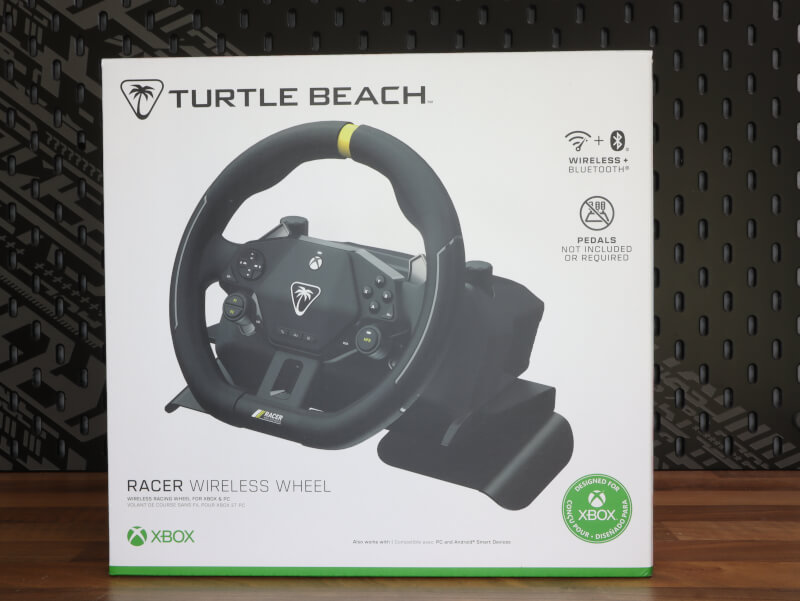
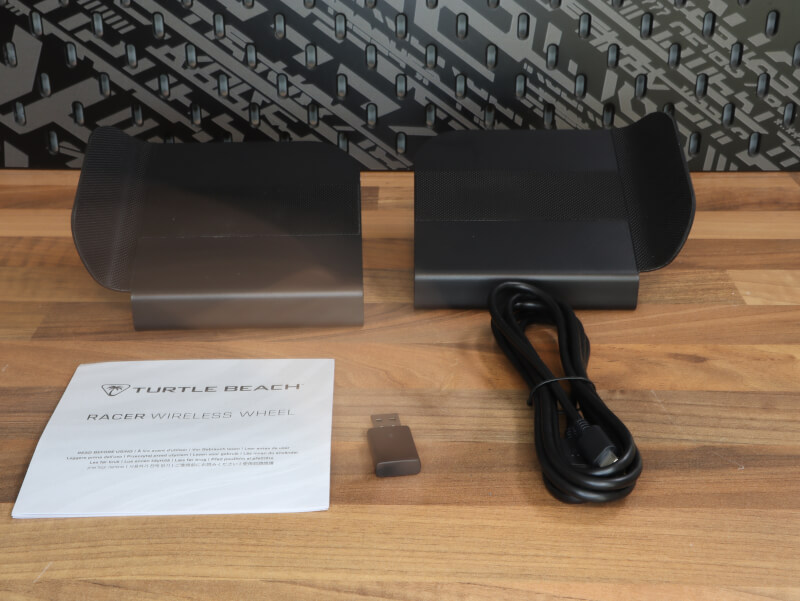
When you open the box for the Turtle Beach Racer Wireless Racing Wheel, you are greeted by a compact but complete setup. The wheel itself has integrated pedals directly into the base, making it ideal for use on a table or lap without the need for additional equipment. A solid lap support is included, which provides stability while driving, a USB dongle for the wireless 2.4GHz connection, and a USB-C cable for charging. Finally, you will find a quick start guide that makes the setup simple and clear, so you can quickly start driving. Everything is packaged conveniently and ready to use right out of the box.
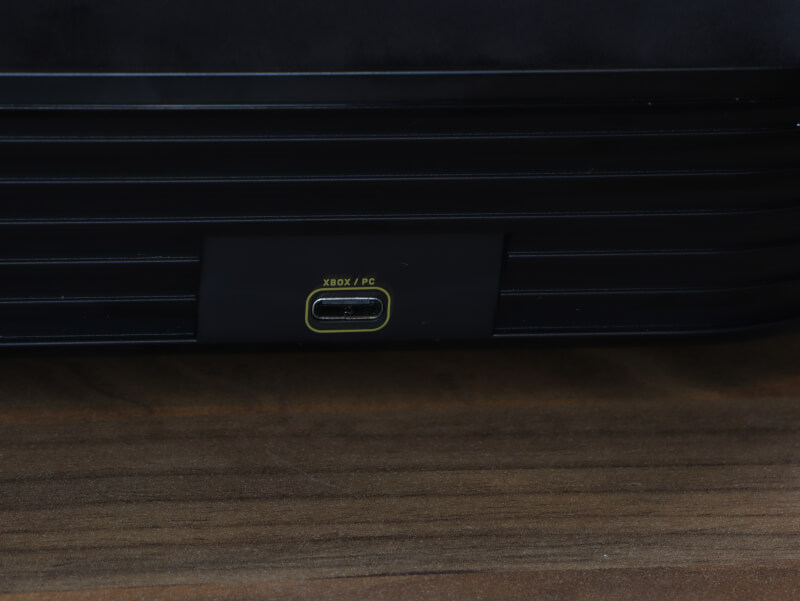
The Turtle Beach Racer Wireless Racing Wheel features a USB-C port for charging and firmware updates, as well as a wireless USB dongle that connects to your Xbox or PC via 2.4GHz low-latency technology. The wheel also features an integrated headset port so you can connect a wired headset directly for clear audio and in-game communication. All connections are discreetly placed and easily accessible, making setup quick and easy – with no need for loose cables or external modules.
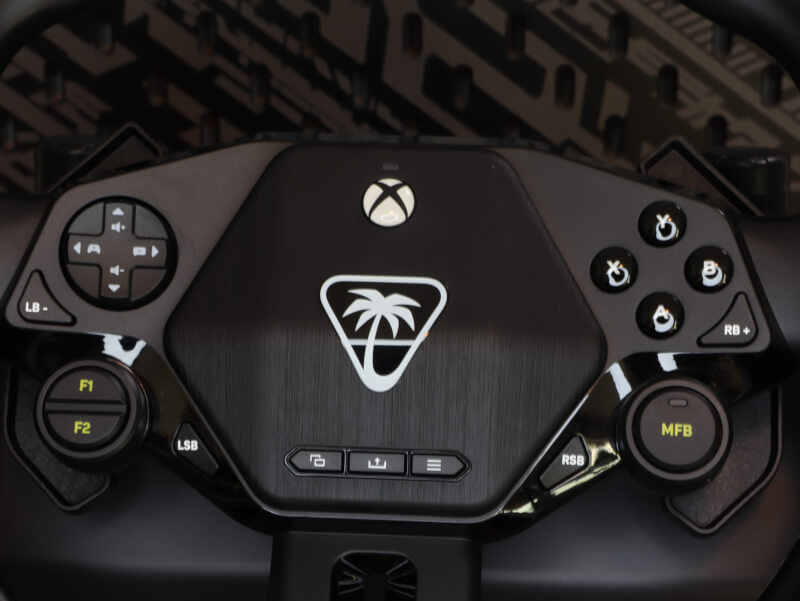
The Turtle Beach Racer Wireless Racing Wheel features a full set of Xbox-style controls, including A, B, X, and Y buttons, a D-pad, and centrally located Menu and View buttons for easy access. In addition, the magnetic paddle shifters on the rear double as accelerator and brake, allowing you to control the car directly from the wheel without separate pedals. There's also a multi-function knob on the front for adjusting sensitivity, vibration intensity, and sound, as well as a pair of additional function buttons for quick access to game and system settings. Everything is ergonomically positioned for comfortable and precise driving.
Software
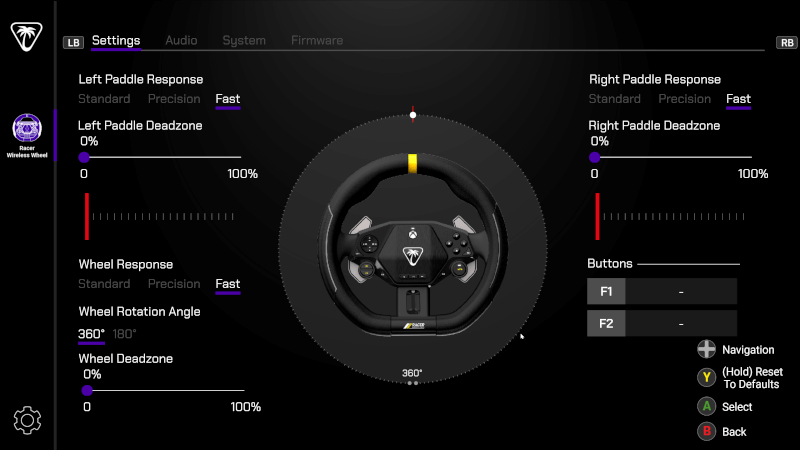
Turtle Beach Control Center 2 is the software used to customize and fine-tune the settings of the Racer Wireless Racing Wheel . The program provides a clear interface where you can adjust everything from wheel response and rotation angle to deadzone and paddle sensitivity . Here you can choose between different response profiles such as Standard , Precision and Fast , depending on how direct the steering feels. The integrated pedals (paddle shifters) can be individually fine-tuned with both deadzone and sensitivity settings, so you get precise control over the accelerator and brake. The software also allows for firmware updates, audio control and a quick reset of all settings, making it a central tool for optimizing the wheel for your personal driving style.
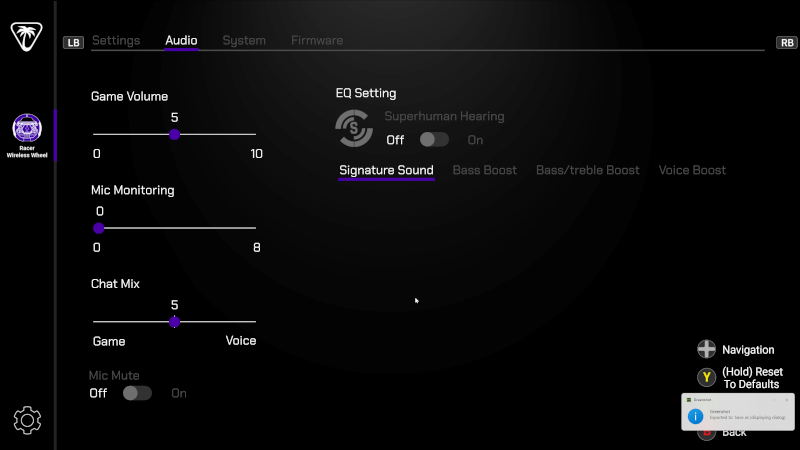
The next menu allows the user to fine-tune sound settings directly for the Racer Wireless Racing Wheel. Here, you can adjust Game Volume, Mic Monitoring and Chat Mix so that the balance between game and voice sound exactly matches your preferences. Under EQ Setting, you can choose between different sound profiles such as Signature Sound, Bass Boost, Bass/Treble Boost and Voice Boost – as well as activate Turtle Beach's well-known Superhuman Hearing function for better detailed sound during games. The menu also includes the option to turn off the microphone with Mic Mute, and all changes can be reset to default with a single tap. The layout is simple, clear and optimized for quick adjustments in the middle of the game.
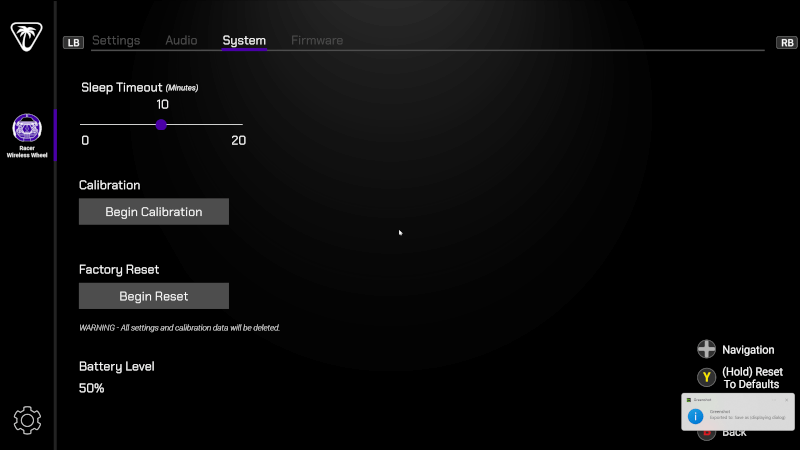
The last menu we will go through is where you can adjust and maintain the basic functions of the Racer Wireless Racing Wheel. Here you can set the Sleep Timeout, which determines how long the wheel remains active before it automatically goes to sleep to save power. The menu also allows you to perform a full Calibration, so that the wheel is reset and registers movements accurately, as well as a Factory Reset, which restores all settings to factory defaults. At the bottom, the Battery Level is displayed, so you can easily keep an eye on the battery status. Everything is presented in a simple layout that makes it quick to customize and maintain the equipment.
The test – Use and comfort
The experience with the Turtle Beach Racer Wireless Racing Wheel is in many ways twofold – where comfort and flexibility are the draw, while performance and precision have some clear limitations. First of all, it must be said that comfort is one of the greatest strengths of the wheel. The compact shape and integrated pedals make it incredibly easy to take out, use from the sofa or armchair and pack away again after use. It requires neither table mounting nor pedal space on the floor, which provides a much more relaxed and flexible experience, especially for those who do not want a permanent setup. The grip feels nice in the hands with its rubber coating, and the included lap support makes it possible to play for longer periods of time without discomfort.
When it comes to build quality, the Racer Wireless Wheel is on the lighter end of the spectrum. The materials seem solid enough for the purpose, but you quickly notice that the product is aimed at the more casual segment rather than hardcore sim racing. There is a bit of play in the steering wheel, and the mechanical resistance lacks the heft and realism found in more expensive models with force feedback. This means that the steering wheel does not “hold back” during turns, but instead moves easily and freely, which can take away some of the sense of control and precision.
When it comes to performance, the wheel is best in the more casual racing titles. In games like Forza Horizon it delivers a reasonable experience, with the steering feeling smooth and the response acceptable, but there is a noticeable lag – especially when making quick changes of direction or having to combine the throttle and steering at the same time. It can feel as if the input isn’t always registered in line with the movement, and this makes fine-tuning the throttle a bit difficult. This is especially evident when trying to hold the throttle at a certain pressure point while turning – here the integrated “pedals” (paddle shifters) don’t respond quite as nuanced as physical pedals would.
In Euro Truck Simulator 2, the limitations became even more apparent. Here, the maximum 360 degrees of rotation feels too limited to provide the necessary control over heavy trucks. This means that you quickly reach the extreme position of the steering wheel, and the control in the game feels more binary - either you turn or you don't. This makes it difficult to make small, precise adjustments, and you lose the sense of realism that many seek in the simulator genre.
On the positive side, it should be emphasized that the wheel is wireless and extremely user-friendly. The low weight makes it easy to handle, and the battery life is solid enough for several hours of non-stop gaming. In addition, Turtle Beach's own Control Center 2 software allows you to fine-tune steering response, dead zones and sensitivity, which can actually improve the experience significantly if you spend a little time adjusting the settings to your playing style.
Price
I have found a price for the Racer Wireless Racing Wheel from Turtle Beach of $179.99.

If you want to find more information about the Racer Wireless Racing Wheel from Turtle Beach, you can click on the banner above.
Conclusion
The Turtle Beach Racer Wireless Racing Wheel strikes an interesting middle ground in the racing wheel market. It is a product that is clearly aimed at casual gamers who want a flexible and user-friendly experience without having to go out and invest in a full sim racing setup. The wheel is designed to be light, wireless and quickly ready for use – and it delivers on those points. Flexibility is undoubtedly one of its greatest strengths. The integrated pedals, compact shape and lap support mean that you can sit on the couch, take a few quick races in Forza or roll out onto the highway in Euro Truck Simulator 2, without having to find space for a pedal module or table mounting. This makes the experience relaxed and accessible, and in this context Turtle Beach has created a product that hits the spot for that type of user.
The comfort is also worth highlighting. The steering wheel fits well in the hands, thanks to the rubberized surface, and the low weight means that you don't experience fatigue during longer sessions. The lap support contributes to a stable and comfortable experience, and there is no discomfort when playing for a long time, even without a fixed mount. The 2.4GHz wireless connection works stably, and the battery life is surprisingly good - an important plus for those who prefer cable-free gaming.
When it comes to functionality, Turtle Beach delivers an intuitive and user-friendly setup. The Control Center 2 software allows you to adjust wheel response, deadzones and sensitivity, and you can choose between different profiles such as Standard, Precision and Fast. It is easy to find the settings that best suit your playstyle, and it elevates the experience a bit if you spend time fine-tuning the system. At the same time, there are audio functions that can be adjusted directly in the software, and the wheel can even be used as a controller with a full Xbox layout – a feature that provides extra value in everyday life.
When it comes to performance, however, the picture is more nuanced. The Racer Wireless Wheel performs well in arcade-style titles like Forza Horizon, where precision requirements aren't quite as high. Here, the steering feels smooth and reasonably responsive, but there's still a noticeable lag, especially during quick changes of direction or when combining steering and acceleration. The integrated "pedals" function as paddle shifters, and while the idea is clever for the sake of flexibility, you lose some of the feel and control you normally get with separate pedals.
In more realistic titles like Euro Truck Simulator 2, the steering wheel shows its limitations. The maximum rotation angle of 360 degrees makes the steering imprecise and rough, and the lack of resistance means that the steering wheel does not feel natural while driving. Instead, it moves freely, without the weight and feedback that usually gives a feeling of contact with the road. This is reinforced by a slight mechanical play in the construction, which means that movements are not always registered as precisely as one would like.
In terms of quality, the product is on the light end. The materials feel solid enough for the purpose, but not premium. However, the overall build quality matches the price, which is around $179.99 – which must be said to be reasonable for a wireless steering wheel that offers both flexibility and multi-compatibility with Xbox and PC. For the price, you get a product that delivers on comfort, usability and functionality, but which naturally has to compromise on realism and precision.
The Turtle Beach Racer Wireless Racing Wheel is not for those who dream of realistic feedback, full rotation angle or millimeter control in simulations. On the contrary, it is for those who want an easy and fun steering wheel that can be quickly taken out, used from the couch and put away again, without cables and hassle. It is perfect for casual racing and light driving games, where you want a relaxed experience rather than professional performance.
Overall, the steering wheel delivers an entertaining and comfortable experience for its target audience, but without being able to match the more expensive competitors in terms of precision and realism. However, the price and flexibility save the overall impression, and as a wireless plug-and-play steering wheel for light use, it is a sensible choice.
I end up with a score of 7 out of 10, where it is undoubtedly the purpose and price that pulls up the overall experience, versus the control and precision.
Advantages:
Disadvantages:
Score: 7