18 Sep
keyboard

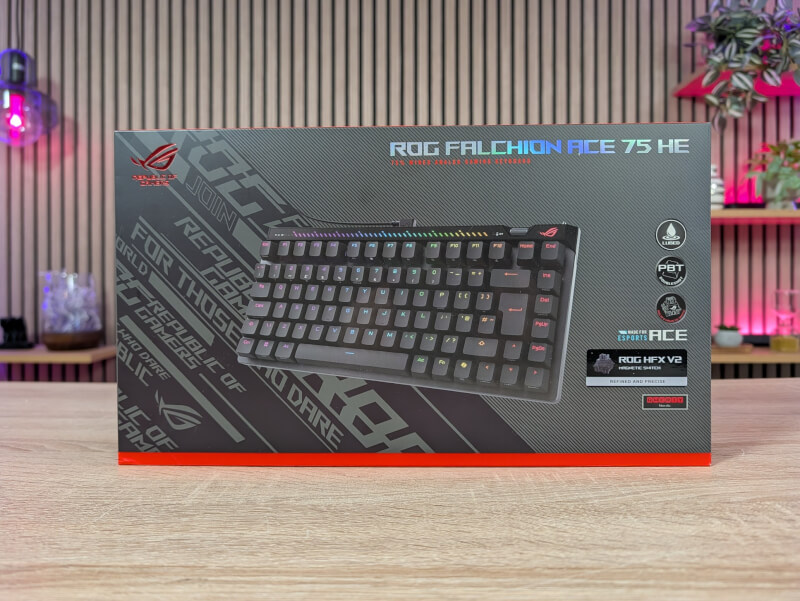
The ASUS ROG Falchion Ace 75 HE is not the first keyboard in the Falchion series to feature magnetic switches. We also saw this on the ROG Falchion Ace HFX, which we reviewed at the end of 2024. However, here we now get an 8000 Hz polling rate and updated HFX V2 or V2X switches.
If you've seen the ASUS ROG Falchion series before, the design will be familiar. However, ASUS has updated some aspects with the ASUS ROG Falchion Ace 75 HE.
Where previously it was a super compact 65% keyboard, the last generation grew to a 75% format. This is also the case here, where space has been made for function keys, as well as more space at the top for a little more RGB along with additional function keys.
It's still a compact form factor that doesn't take up much space on your desk.
The design style is what can best be called ASUS ROG classic. The keyboard is available in a black and a white version, with the black version being the one we visited.
A nice semi-hard case is included for the ASUS ROG Falchion Ace 75 HE. So this and the compact form factor mean that it is well suited for taking on the go.
The keys consist of Double Shot PBT keycaps, and the new ROG HFX V2 switches in the version we have for test, but it is also available with ROG V2X switches.
At the top of the keyboard we get an RGB field that serves both as decoration and as an indicator light when changing settings, such as the actuation distance of the keys.
On the left side of the top there is a function key and a touch field. The button allows you to change what the touch field can adjust. These are things like media playback, volume, lighting settings or other functions that you can customize yourself.
On the right side we find a switch that can activate or deactivate the Rapid Trigger function and a rotary knob that can quickly and easily adjust the actuation distance of the keys.
The ASUS ROG Falchion Ace 75 HE connects via USB cable. There is a USB-C connection at the top of the keyboard and you get a woven USB-C to USB-A cable with an angled connector in the box.
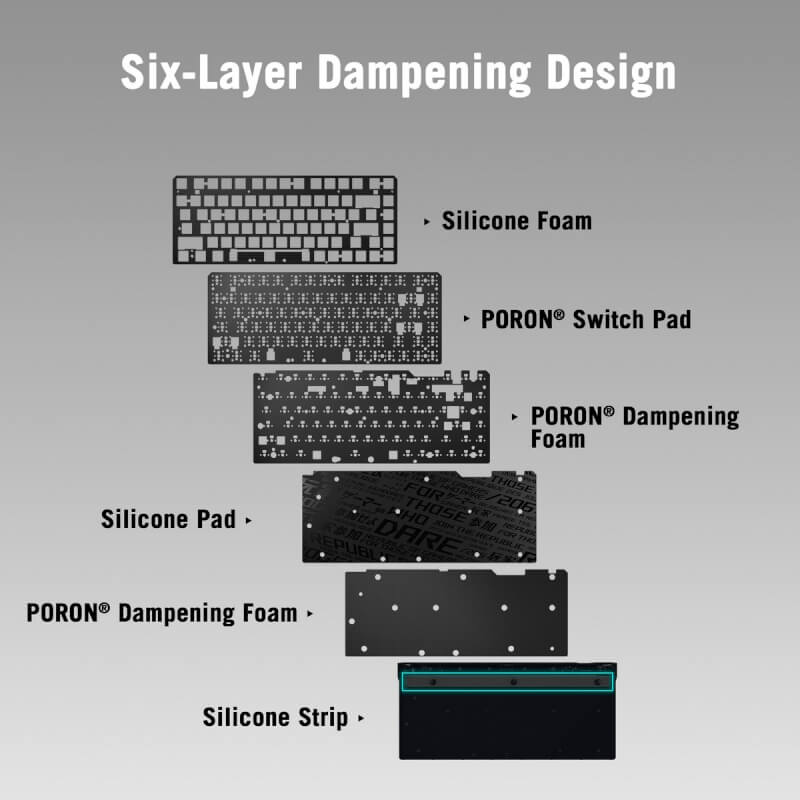
ASUS has also done a good job of giving the ASUS ROG Falchion Ace 75 HE a pleasant sound profile. Inside the keyboard, they have made six layers of noise-dampening material, with three layers of PORON foam combined with a Silicone layer.
As we've seen before, ASUS has moved the customization of their devices to their web-based solution, Gear Link. This means you no longer need to install separate software, as was previously the case with ASUS ROG Armoury Crate.
However, you still have all the same options for fitting all the many possibilities with the ASUS ROG Falchion Ace 75 HE.
It's all the normal stuff like customizing the RGB lighting and the functions of the individual keys. Here alone, there are plenty of options to customize the functions exactly as you want.
What is more important for most people who buy a keyboard of this type, however, is probably the many options that you get with an Analog Hall Effect keyboard, and of course there are plenty of options with that.
You can set the actuation and reset distances for each key yourself, so you can get a keyboard that responds just the way you prefer.
You can adjust things from 0.1 mm up to 3.5 mm, so there's a reasonable range to work with. You also have the option to set a Dead Zone for the keys at both the top and bottom.
There are of course also options for Rapid Trigger and Speed Tap, to take advantage of all the possibilities with Hall Effect switches. As always, it is worth remembering that not all games allow all the possibilities, which can lead to bans.
Overall, there are a ton of options with ASUS' Gear Link software, and it works just as well as their dedicated software in every way.
I actually prefer it this way because ASUS hasn't bundled a lot of other things into the software experience here. There's no Wallpaper store, Game First features, or anything else.
Here you will find only what you need for your device, and as soon as you are finished customizing things, the settings are saved locally to one of the five profiles in the keyboard, and you can close Gear Link. After that, there is nothing running in the background in Windows, sucking up resources.
I've been using the ASUS ROG Falchion Ace 75 HE for a few weeks now for a combination of gaming and work.
The typing experience has been super comfortable and responsive. I personally prefer a full-size keyboard for work, so it's been a bit of a step down here, with the compact 75% form factor.
However, that doesn't change the comfortable feel of the keys. Here you can clearly feel the work ASUS has done with the six layers of damping.
Super granular customization is possible via ASUS GEAR Link. The magnetic switches allow you to adjust the actuation distance, collectively for all keys, or individually for complete customization.
The Rapid Trigger and Speed Tap options also mean that you can stay ahead of the game with the latest features. However, you should be aware that Speed Tap, for example, is not allowed in all games. Therefore, it is also turned off by default, but can be easily activated via Gear Link.
One practical point that I don't think works quite well is ASUS' choice of a touch pad at the top of the keyboard for controlling things like media controls, volume, etc. First, I don't think the touch pad is particularly conveniently placed, and it doesn't feel as natural to use compared to a physical button.
At the same time, I think the sensitivity is too low. For example, I had to swipe five times to turn the brightness all the way down, and it's the same for the volume. Overall, I think it's the worst implementation of this kind of media and brightness control I've seen on a keyboard in this price range.
At the time of writing, I cannot find an online price for the ASUS ROG Falchion Ace 75 HE. However, we have been informed by ASUS that the suggested retail price is $186.99.
With the ROG Falchion Ace 75 HE, ASUS has made a nice update to the existing Falchion series, so that it is now also at the forefront of the 8000 Hz trend and has ASUS' latest switches.
As I have mentioned many times, the new high-end features such as Hall Effect switches and 8000 Hz polling rate are details that are aimed at the truly discerning users who already play at a high level and want to optimize their equipment so that they can squeeze the last margins out of their games.
It can undoubtedly make a difference for some, but if you, like myself, are far from a Pro Gamer level, it probably won't push things enough and make me a much better gamer.
That said, the ASUS ROG Falchion Ace 75 HE is still a nice and solid keyboard that feels great to use. However, ASUS also charges a lot for it.
Personally, I feel that there are better alternatives, with largely the same features, but a lower price from, for example, Corsair.
We end up with a final grade of 8, for a nice and complete Hall Effect keyboard with lots of High End features, which however do not quite stand out enough from the crowd to justify the high price.
Benefits
Disadvantages