18 Sep
keyboard

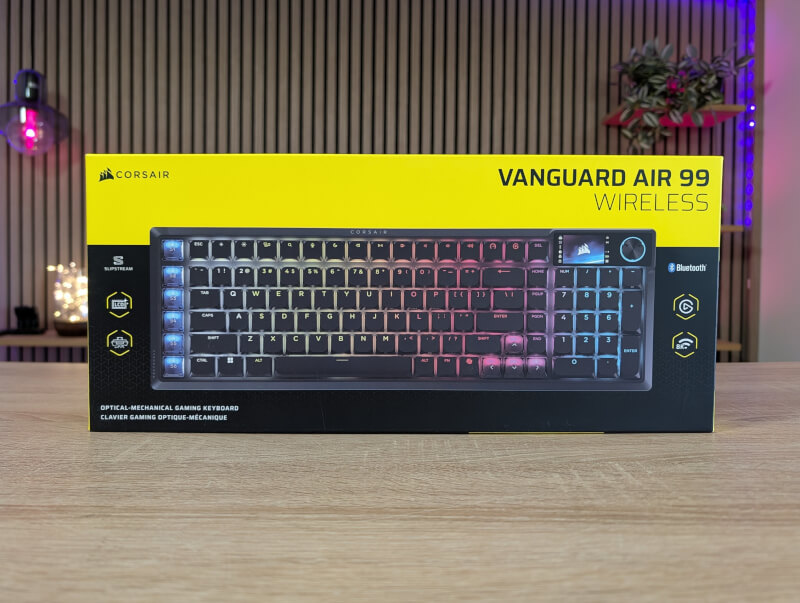
As the name suggests, this is of course a wireless keyboard. However, we are not cheated of high-end features, so it has both the option of an 8000 Hz polling rate and optical switches. So this is not a Hall Effect keyboard, even though that is the big buzzword at the moment.
The Corsair Vanguard Air 99 Wireless is a full-size keyboard, so you get all the functionality of the function keys and numpad here. The layout is still a bit more compressed than a standard full-size keyboard, however, as Corsair has added six extra Stream Deck keys (SD-Keys) to the left side of the keyboard. A selection of physical keycaps are included in the box that are designed for these keys so that the icon can reflect the function you want to use with them.
They can be programmed either via the normal software, or used as part of an Elgato Stream Deck integration in the dedicated app. I'll get into that a little more later.
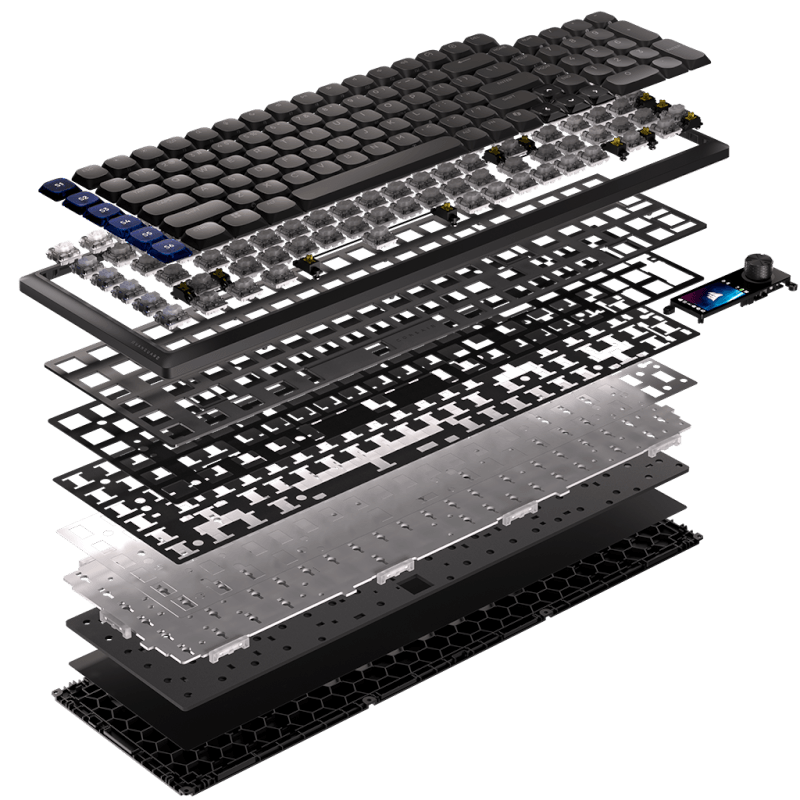
The Corsair Vanguard Air 99 Wireless feels solid and well-built with an aluminum top frame and a plastic bottom. It is possible to get the Corsair Vanguard Air 99 Wireless in either black or white.
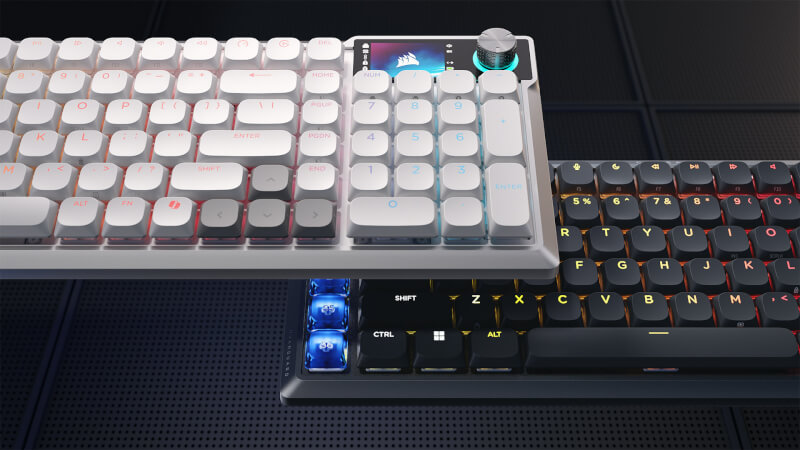
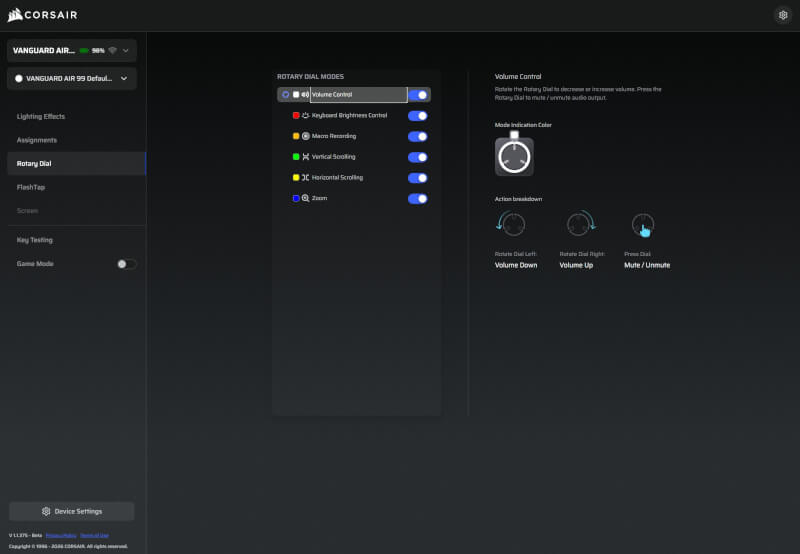
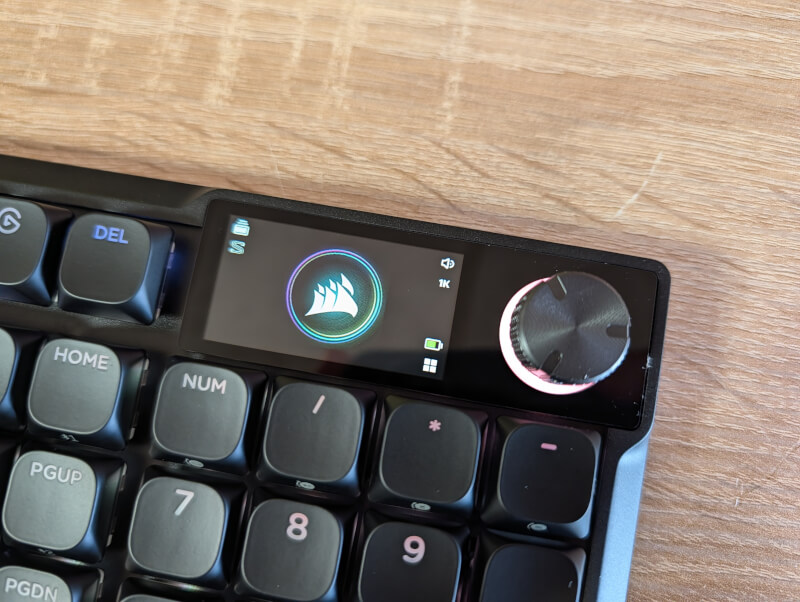
The internal details are also in place, with no less than five layers of sound-absorbing material in the thin keyboard. The design is reasonably subdued without a lot of screaming “gaming” details. There is of course RGB lighting in the keys, which can be customized for each individual key in Corsair’s software. In addition to that, there is a small 1.9” IPS screen, in the upper right corner. Here you can see a few status indicators for the keyboard such as battery, polling rate, what function the rotary knob next to it has, etc.
Otherwise, there are a couple of discreet Corsair logos at the top and side, so you can largely decide for yourself how flashy the keyboard should be based on which lighting settings you use.
We get black PBT Double Shot keycaps on all the keys, except for the six SD-Keys and the arrow keys. The six SD-Keys are made in a bluish color, while the arrow keys are transparent. Personally, I would have preferred all the keys to be the same color, but that's a matter of taste.
The design of the included keycaps is also a bit different, with very rounded tops and I'm still not entirely sure whether I like them or not. However, they are standard MX mounts, so if you want you can swap them out for others without any problems.
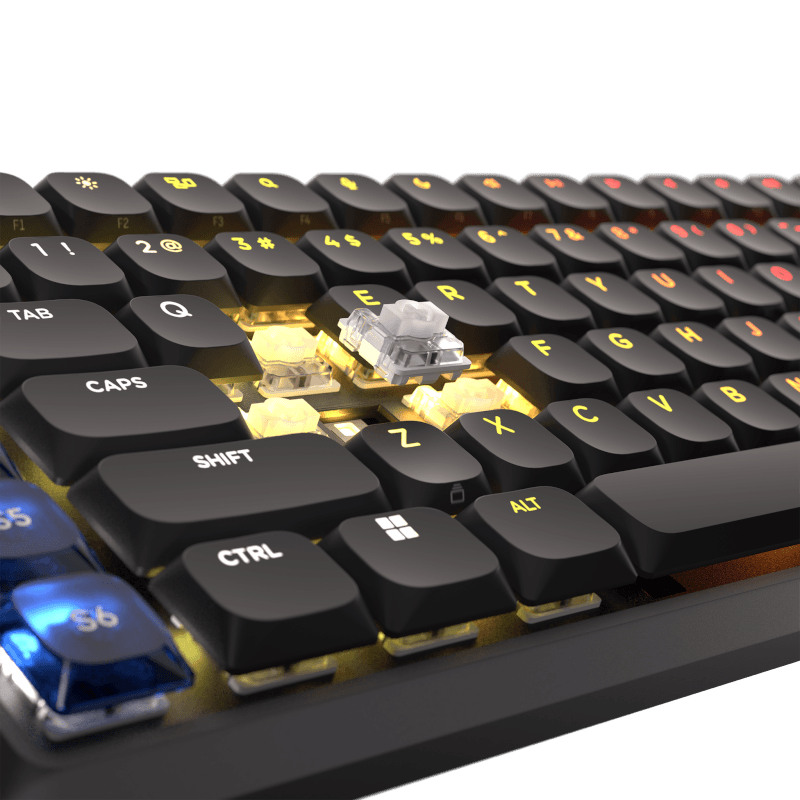
There are no dedicated function keys for media control etc. Instead, there are a number of secondary functions on the F1 to F12 keys, for example, which can be used via the FN key. When the FN key is pressed, the light in all other keys turns off, and only the one with a secondary function lights up. It's a nice little detail that makes it easier to get an overview of the options. The functions can of course be customized via Corsair's software.
There are two dedicated function keys, which by default are used to activate Gaming Mode and then a shortcut key for the Elgato Stream Deck software.
The switches are Corsair's OPX low profile optical switches. They are designed to have a quiet profile and an actuation point of 1.5mm, with a total distance of 2.5mm. They use light instead of a mechanical switch, and therefore have both a faster response time and a significantly longer life expectancy. Corsair's OPX switches are rated for 80 million clicks.
At the top of the keyboard we find a USB-C port for charging or connecting via cable. There is also a switch here that can switch between the wireless Corsair Slipstream V2 connection, via the included USB Dongle, or Bluetooth. It allows for up to an 8000 Hz polling rate.
There is also a button where you can switch between a Windows or Mac setting, depending on where you want to use the Corsair Vanguard Air 99 Wireless.
Via cable, there is also the option of connecting to Xbox One and Series X/S or PlayStation 4 and 5. The functionality should work without the need for anything other than connecting the keyboard to Xbox, while connecting to PlayStation requires setting the keyboard to PlayStation mode via FN + Windows key.
To top it off, there is also a small magnetic storage space at the top for the included USB Dongle, so it has a place to live if you need to take the Corsair Vanguard Air 99 Wireless with you on the go.
There's not much going on at the bottom. There's a bit of decoration with the "new" Corsair pattern found across all their newer devices. There's a bit of keyboard height adjustment with folding legs that can be set in two stages.
Just like we've seen with some of the new devices from Corsair, they've moved away from their heavy iCUE software. The Corsair Vanguard Air 99 Wireless is customized via Corsair's new web-based app directly in the browser.
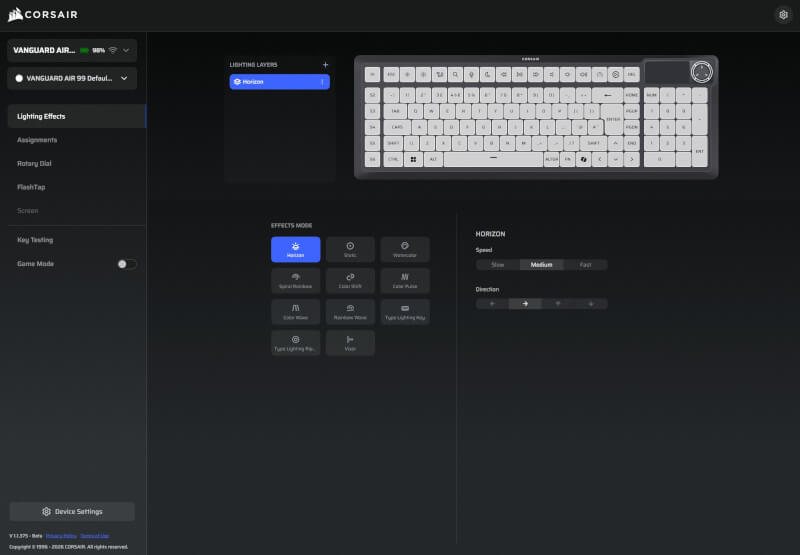
Here you can customize the various functions. Of course, these are things like the RGB lighting, but also the different functions on the keys. You can customize them pretty much as you want, with options for different profiles and custom functions or macros, on almost all the keys. You can also set up FlashTap (Corsair's version of SOCD, which prioritizes your presses for perfect "counter-strafes" in shooters).
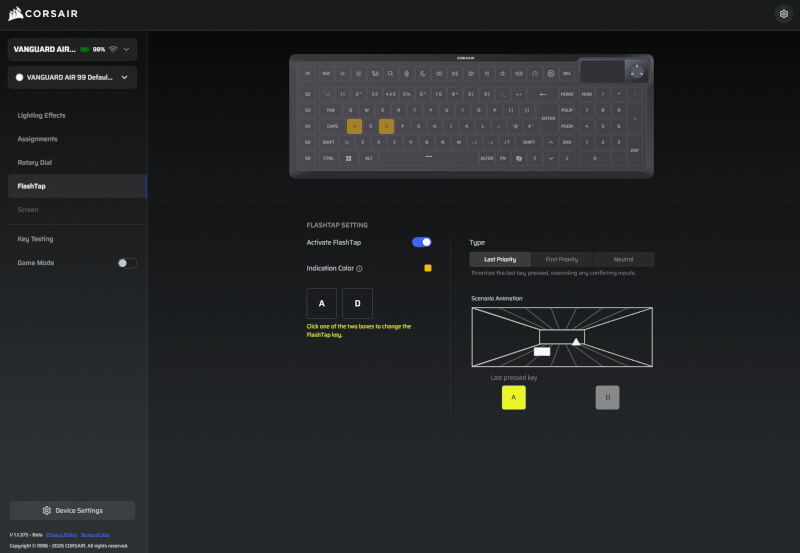 However, it is a feature that you should be aware of, is not allowed everywhere and in the worst case can lead to exclusion from certain games.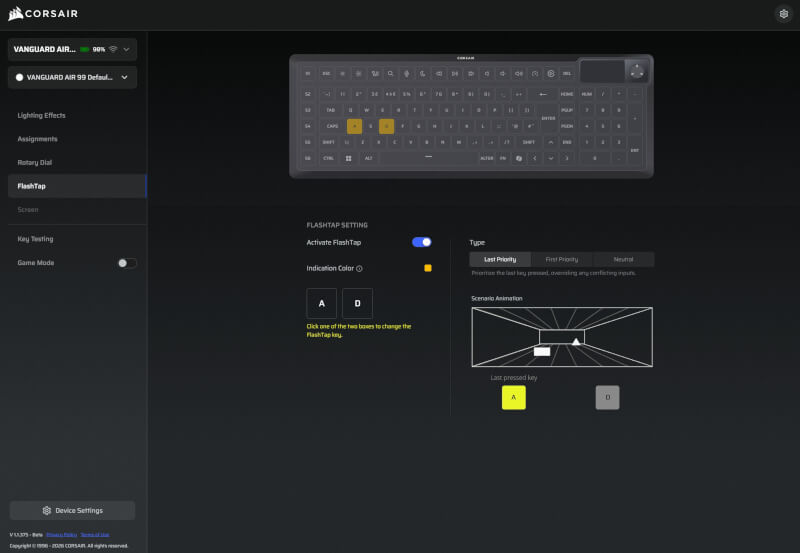
The keyboard comes with a polling rate of 1000 Hz, but you can turn it up to a lightning-fast 8000 Hz if you want absolutely minimal lag. Just be aware that this means that the battery life of the keyboard drops significantly.
It is also in the software here that you can customize what is displayed on the small IPS screen. There is currently no option to display stats from your PC, such as temperature or other things, but this may come with an update at some point. Right now you can choose between different static or animated images, and you can also upload your own, so you can customize it completely as you like.
If you use other Elgato Stream Deck products and have a setup configured through the Stream Deck software, you can also use it with the Corsair Vanguard Air 99 Wireless. Here, the six SD-Keys will appear as a configurable part of the software, and you can use them together with the other keys, for example on your dedicated Stream Deck.
I've had early access to the Corsair Vanguard Air 99 Wireless, which hits stores at the same time we're publishing this review. I've been using it for about two weeks, for a good mix of desktop use for work and of course gaming.
I personally usually prefer low-profile keyboards, so on that front I immediately felt at home with the Corsair Vanguard Air 99 Wireless.
However, I have a hard time getting used to keyboards that have extra keys on the left side of the keyboard, as is the case here with the six SD-Keys. I have found that my muscle memory on that front is very locked in and I, with my little finger, quite unconsciously, seek the edge of the keyboard, in relation to the position of my hand and fingers.
When there are extra keys, it means that my fingers are placed a tad too far to the left, and for example, instead of the Shift key, I hit S5, etc.
This means that there is always a fairly steep, and sometimes frustrating, learning curve for me when using keyboards of that type, and as a general rule, I prefer not to have extra keys here.
However, I am aware that it is a very personal thing, and that on that front I am probably very set in my ways, as I have spent many hours a day at a PC for quite a few years now. I can easily see why it makes sense to have any extra shortcuts placed there, as the left hand is typically a bit more stationary and can therefore more easily use any shortcuts quickly.
I also notice that over my time with the Corsair Vanguard Air 99 Wireless I have become better at adjusting and adapting, so it would be something I would get used to over time. However, it is worth paying attention to before you dive into a Corsair Vanguard Air 99 Wireless keyboard if you are an old, stuck-up nerd like me. It will probably take some getting used to.
If you ignore the above, which has been a source of some frustration, it has been an exquisite pleasure to have a visit from the Corsair Vanguard Air 99 Wireless.
The wireless Slipstream connection has worked 100% without any problems and you get a fast and responsive keyboard with a nice low and quiet profile.
However, as in many other cases, I honestly can't tell the difference between the standard 1000 Hz polling rate and 8000 Hz. It's not something that pushes the margins enough in my games to make a noticeable difference. So the majority of my testing has been done at 1000 Hz to get significantly more out of the battery.
Both the typing and gaming experience with the Vanguard Air 99 Wireless has been great. Corsair's OPX switches are wonderfully quiet, which I prefer. If you prefer a more clicky sound like you get with normal mechanical switches, you'll be disappointed here.
There are lots of great customization options through Corsair's web hub and if you delve into them, there are also a lot of physical shortcuts on the keyboard where things like lighting etc. can be customized without the need to use software.
Since I did this test before the official release of the Corsair Vanguard Air 99 Wireless, I can't get any prices from Danish webshops. However, Corsair states a suggested retail price of around $259.99.
It's definitely on the expensive side and well above even the most recent Hall Effect keyboards we've looked at. It's clearly the wireless 8000 Hz technology, and perhaps partly the inclusion of the small IPS display, that drives up the price. As soon as we have to include that in the package, the price increases significantly.
The Corsair Vanguard Air 99 Wireless is a solid and stylish keyboard with a low profile and fast optical switches that are also very quiet. Overall, it provides a great typing experience and is a great partner on the desk if you prefer a low profile keyboard.
You get a super fast wireless connection and some extra functionality, in the form of the small IPS display and the six SD-Keys.
However, it all comes at a price, which is on the very high end. It's a tough pill for me to swallow, with an otherwise nice and solid keyboard. This is especially because I personally don't get much out of the more expensive elements, like the wireless 8000 Hz polling rate or the small IPS Display.
The first feature doesn't make any difference to me in my games, and the second feature is primarily decorative, with no other function than being able to display images.
However, this is a personal assessment, because you can't avoid the fact that it is currently expensive if you want to enjoy wireless freedom, but at the same time want the latest technology with 8000 Hz polling rate. If you are in this segment, the price falls in this range and then the question is more whether you prefer Corsair's design and software implementation over the competitors.
We end up with a final grade of 8 and an Enthusiast Only Award, for a super solid and class-leading keyboard. However, it is with the caveat that it is targeted at users in the demanding segment who want 8000 Hz polling rate in a wireless modern package.
For the average mortal gamer, like myself, I would say that the price for the extra features is TOO high.
Benefits
Disadvantages