23 Jul
monitor

The big selling point of this display is of course the 5K (5120x2880) resolution combined with the 180 Hz refresh rate. However, it is worth noting that ASUS states that only newer graphics cards in the Nvidia 5000 series and AMD RX 7600 or newer meet the requirements to deliver 5K at 180 Hz.
By default, the refresh rate is limited to 120 Hz at 5K, and if you want to go up to 180 Hz, you need to overclock the screen via the on-screen menu. However, as mentioned, this is only possible with newer graphics cards.
It is also worth checking out the Frame Rate Boost option, where you can easily switch to QHD resolution and get a refresh rate of up to 330 Hz.
Design-wise, the ASUS ROG Strix 5K XG27JCG doesn't stand out much from the other monitors in ASUS' Strix series. They've kept a fairly consistent design style for a number of years now.
The design is fairly subdued with a gray plastic frame, with a rather discreet ROG logo at the bottom. The bezels are reasonably slim on the sides and top, while there is a little more filling at the bottom.
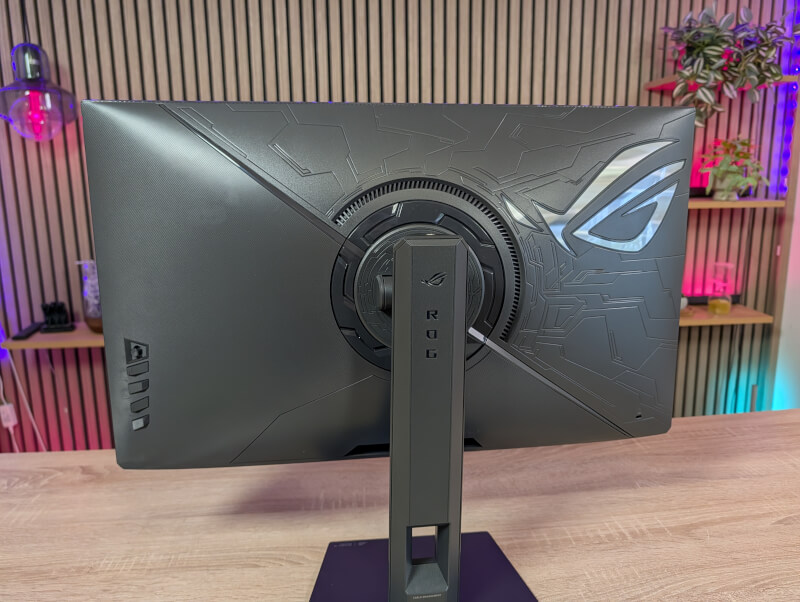
The back of the monitor has a little more flair in the form of a significantly larger ROG logo along with a tech-inspired pattern, which is very typical of ASUS ROG. If you want to really turn up the gaming flair, there is also the option of RGB lighting in the ROG logo here on the back.
The screen's control inputs for the on-screen menu are found on one side and consist of a small joystick and four buttons.
The monitor comes with a small shield that covers the monitor's connector. This allows for a bit neater cable routing.
Under the shield we find the power connector, two HDMI 2.1, a DisplayPort 1.4 DSC, a USB-C with the option for DP ALT Mode and 15W power delivery, a 3.5 mm audio jack and finally a USB 3.2 HUB with three USB-A connectors.
It is possible to set up the monitor to function as a KVM Switch. Then you can connect accessories, such as a mouse and keyboard, directly to the monitor and when you switch between two connected devices, the mouse and keyboard follow along. This is very practical if, for example, you have a desktop gaming PC, but also supplement it with a laptop for work or other purposes.
The monitor comes with an internal power supply, so there is no "brick" that you have to find space for, just a power cable.
The stand for the monitor is nicely simple with a flat and stable base and not the long thin legs that have been a regular feature of other ASUS ROG monitors. There is plenty of adjustment in height, tilt and pivot, and you can rotate the screen into a vertical position if you need to.
However, I could have thought of a little more height on the screen.
At the top of the stand we also get a 1/4" screw mount for accessories such as webcams, lights or the like.
I've had the ASUS ROG Strix 5K XG27JCG for a few weeks now, where it has been used in a combination of work, normal desktop use, and then of course as much gaming as I've been able to squeeze into my schedule.
Since it's an IPS panel, you won't get the super deep blacks that we've seen on the OLED screens we've tested the last few times. That said, the screen has been a great experience to have on hand.
The IPS panel delivers plenty of light. Where OLED often struggles with full-screen brightness, this display delivers over 400 nits in SDR and a whopping 785 nits in HDR. The backlight is controlled by 10 horizontal dimming zones, and with a DCI-P3 coverage of 93%, it secures its VESA DisplayHDR 600 certification with confidence.
The first thing that catches your eye about the XG27JCG is the resolution. With 5K on a 27-inch screen, we hit a pixel density of 218 ppi. That's "Retina" territory, meaning the pixel structure is completely invisible to the naked eye. Text is razor-sharp and games are incredibly detailed.
As mentioned, the color reproduction is really good and even though we don't quite reach OLED levels, the combination of a color coverage of 97% of DCI‑P3 and HDR600 still provides a super good and beautiful experience for both gaming and media consumption on the ASUS ROG Strix 5K XG27JCG.
ASUS itself states a response time of 0.03 ms, which was very good in my test. I did not experience any unintentional motion blur or ghosting during my test.
The 5K resolution naturally means that you need to have pretty solid hardware in your PC if you want to make the most of it. I've tested with an RX 9070 XT, and although it's a powerful enough card for most things, it's nowhere near being able to keep up with modern games at 5K resolution. Fortunately, that can be remedied by using modern upscaling technologies like FSR. In those cases, the resolution became more manageable, even in games like Space Marine 2 and Cyberpunk 2077.
However, the ASUS ROG Strix 5K XG27JCG also offers the rather special option of using the Frame Rate Boost function. Here, you can quickly switch via the on-screen menu to a 2560x1440 resolution, with the option of a refresh rate of up to 330 Hz.
2560x1440 on a 27” screen is still a super nice resolution for gaming and compared to 5K it is somewhat easier to pull off, even without the use of “cheats” like FSR or DLSS.
If you play games where refresh rate is king, but still prefer a higher resolution screen for everyday use, then this is a great combination. Just remember to switch BEFORE you start your games, otherwise it can give some strange results.
Personally, I can live with slightly lower framerates and would rather enjoy the high resolution. This meant that I didn't use the Frame Boost feature beyond a few tests along the way.
However, it's great to see that ASUS has pushed the development here. Typically, dual mode monitors of this type are made with the option of 4K and 1080p as resolutions. Here we can now enjoy a boost on that front with the ASUS ROG Strix 5K XG27JCG.
Although the 5K resolution can be heavy to pull in modern gaming, my experience with the ASUS ROG Strix 5K XG27JCG has been incredibly enjoyable.
As you'd expect from an ROG/Strix monitor, it's packed with Asus' software suite. You get GamePlus with crosshairs, timers, and sniper mode. There's full support for Aura Sync RGB lighting, and you can control it all directly from Windows via the DisplayWidget Center app instead of fumbling with buttons on the back.
Asus has always been strong on motion handling, and here they don't disappoint. The display uses a super-precise overdrive that adjusts itself in real time to match the refresh rate and prevent "overshoot" (bright shadows following moving objects).
In addition, you get ELMB Sync (Extreme Low Motion Blur), which allows you to run "backlight strobing" to eliminate motion blur while using Adaptive-Sync (FreeSync/G-Sync). If you want full manual control over the pulse width of the strobing effect, you can switch to ELMB 2 (which disables Adaptive-Sync, however).
At the time of writing, I can find the ASUS ROG Strix 5K XG27JCG with an online price of just under $850.
With so much technology crammed into one case, you might be afraid of the price. But actually, I think ASUS hits a really good level.
It ranks solidly below similar OLED displays in price, and offers a brightness and pixel density that makes it one of the most interesting dual-mode displays on the market right now, perfect for those who both work with graphics during the day and game competitively in the evening.
We land with a final score of 9 and a Great Products Award for a gaming monitor that pushes the development of Dual Mode displays.
Benefits
Disadvantages